

10Apr, 2026
The D365 Lead and Contact Creator Module, Part 2 - Datasource Caching and Custom Controls
In my first post I introduced you to the D365 Lead and Contact Creator Module, which will create a Contact and/or Lead Dynamics when you add it to your form submissions. In this post I’ll cover dynamics data sources such as pick lists and lookups and creating custom controls with their values.
Ok here's where we're at. You can see the 2nd stage in this process is to get picklist and lookup values from Dynamics and make controls with their value in Sitecore.
- Module Overview, the Extension and Module Configuration
- D365 Datasource Caching and Custom Controls <- We’re here
- Form Support and Helpers
- Creating Items in D365
Why Custom Controls?
In my module the form inputs from a visitor are combined with the preset values of a datasource to complete a Lead and Contact. I work at MNP, and in our forms we associate values like Marketing Niche and Region with a submission, which are picklists.
As you can see in this screenshot the selections are dropdowns since the value associated with an option will be an integer, and I’m not going to ask the Authors to enter those. It’s for this reason we want to get all options that make a picklist and present them for selection.
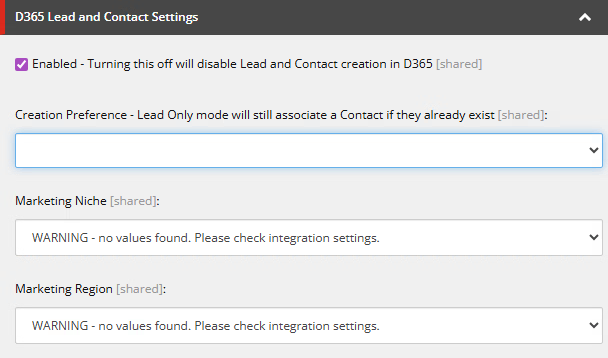
Note: The warning is intentional. I purposely kept the credentials empty which making this screenshot.
Why Am I Caching Picklist Values?
The custom control works well in that it gets a list of options for a picklist so the ID can be associated with a form submission. When a User submits, the ID is set up as an association to the selected option. For efficiency’s sake, I’m caching these picklist values for 50 minutes at a time (we know they only change once every few weeks).
Caching the lists means the calls to D365 will happen rarely, saving a lot of time. In our environment we’re getting dozens of submissions an hour, so if you compound that with every required picklist it really adds up.
Creating the Picklist Controls
Let’s start with the simple part of these controls, which is the HTML select. The config file has the following example fields:
<configuration>
    <sitecore>
        <controlsources>
            <source mode="on" namespace="SitecoreFundamentals.D365LeadContactCreator.Controls" assembly="SitecoreFundamentals.D365LeadContactCreator" prefix="d365PicklistMarketingNiche">
            <source mode="on" namespace="SitecoreFundamentals.D365LeadContactCreator.Controls" assembly="SitecoreFundamentals.D365LeadContactCreator" prefix="d365PicklistMarketingRegion">
        </controlsources>
    </sitecore>
</configuration>
The controls folder will have the necessary code in the D365Picklists.cs file, where we start with a couple classes for the above field types:
public class D365PicklistMarketingNiche : D365PicklistControl<PicklistType>
{
    protected override PicklistType PicklistType => PicklistType.MarketingNiche;
}
public class D365PicklistMarketingRegion : D365PicklistControl<PicklistType>
{
    protected override PicklistType PicklistType => PicklistType.MarketingRegion;
}
The PicklistType is just an enum. I like cleanliness. :).
These fields make use of the D365PickListControl, which calls the caching mechanism to get a KVP of all options and generate a select control from it.
public class D365PicklistControl<TPicklistType> : D365SelectControl<TPicklistType>
{
    protected virtual TPicklistType PicklistType { get; }
    protected override IEnumerable<KeyValuePair<string, string>> GetOptions()
    {
        var picklistTypeEnum = (PicklistType)(object)PicklistType;
        var cachedListData = Gateway.Caching.GetCachedPicklist(picklistTypeEnum);
        if (cachedListData != null && cachedListData.Items.Any())
            return cachedListData.Items.Select(i => new KeyValuePair<string, string>(i.Value, i.Value));
        return Enumerable.Empty<KeyValuePair<string, string>>();
    }
}
We'll get to the caching part later, but you can also see D365SelectControl is used above, and that's what follows in the class as well. It's a simple method:
public abstract class D365SelectControl<T> : Sitecore.Web.UI.HtmlControls.Control
{
    protected abstract IEnumerable<KeyValuePair<string, string>> GetOptions();
    protected override void DoRender(System.Web.UI.HtmlTextWriter output)
    {
        var listOptions = GetOptions().OrderBy(x => x.Value).ToList();
        var sb = new StringBuilder();
        sb.AppendLine("<select" + ControlAttributes + ">");
        if (listOptions.Any())
        {
            // Adding a value of 0 to no selection option as the form won't post empty strings so LoadPostData would not work correctly
            if (!listOptions.Any(opt => string.IsNullOrEmpty(opt.Value)))
                listOptions.Insert(0, new KeyValuePair<string, string>("0", ""));
            foreach (var listOption in listOptions)
            {
                var selected = listOption.Value == Value ? "selected=\"selected\"" : string.Empty;
                var value = string.IsNullOrWhiteSpace(listOption.Value) ? "0" : listOption.Value;
                sb.AppendLine($"<option value=\"{value}\" {selected}>{listOption.Value}</option>");
            }
        }
        else
        {
            sb.AppendLine($"<option value=\"\">WARNING - no values found. Please check integration settings.</option>");
        }
        sb.AppendLine("</select>");
        output.Write(sb.ToString());
    }
    protected override bool LoadPostData(string value)
    {
        if (value == null)
            return false;
        if (this.GetViewStateString("Value") != value)
            Sitecore.Context.ClientPage.Modified = true;
        this.SetViewStateString("Value", value);
        return true;
    }
}
Ok that's everything needed to generate a custom control in the Sitecore Content Editor beside the Core serialized items in the project. Let's move on to retrieval and caching!
Picklist Data Retrieval
Earlier there was this cute little line where GetCachedPicklist was called:
var picklistTypeEnum = (PicklistType)(object)PicklistType;
var cachedListData = Gateway.Caching.GetCachedPicklist(picklistTypeEnum);
This calls the caching area where picklists are cached in the public static list of, you guessed it, CachedPicklistList.
public static List<CachedPicklistList> CachedPicklistLists { get; set; } = new List<CachedPicklistList>();GetCachedPicklist also relies on a list of PicklistDefinitions. The different values stored in this small list will matter later on:
public static List<PicklistDefinition> Picklists { get; set; } = new List<PicklistDefinition>()
{
    new PicklistDefinition()
    {
        Name = PicklistType.MarketingRegion,
        EntityName = PicklistEntityName.lead,
        AttributeName = "mnp_marketingregion"
    },
    new PicklistDefinition()
    {
        Name = PicklistType.MarketingNiche,
        EntityName = PicklistEntityName.lead,
        AttributeName = "mnp_marketingniche"
    }
};
And now here's the method itself which gets the values:
public static CachedPicklistList GetCachedPicklist(PicklistType picklistType)
{
    var picklist = Picklists.FirstOrDefault(l => l.Name == picklistType);
    var cachedPicklist = CachedPicklistLists.FirstOrDefault(c => c.PicklistType == picklistType && c.Expires > DateTime.UtcNow);
    if (cachedPicklist != null)
        return cachedPicklist;
    using (var gateway = new D365Gateway())
    {
        // Calling this also populates the cache
        var listData = gateway.GetPicklistData(picklistType);
        return new CachedPicklistList()
        {
            PicklistType = picklistType,
            Items = listData
        };
    }
}
In here you can see that the cache is being checked for expiry, and if it's not, it'll just return the current stored values. If a new set is needed it's going to use the D365Gateway to call GetPicklistData, which does the calling to D356 and the caching in one operation.
Diving into the gateway there's going to be some flags for synchronous and asynchronous operations since the Sitecore Forms Module needs to run synchronously when presenting authoring controls there, but I won't go into this much detail in this article.
public Dictionary<int, string> GetPicklistData(PicklistType picklistType)
    => GetPicklistDataAsync(picklistType, true).GetAwaiter().GetResult();
public async Task<Dictionary<int, string>> GetPicklistDataAsync(PicklistType picklistType)
    => await GetPicklistDataAsync(picklistType, false);
The GetPicklistDataAsync method is a little lengthy, so I'll break it down. In the first portion the shared authorization functions are called and the url is set up based on what picklistype was passed to it.
private async Task<Dictionary<int, string>> GetPicklistDataAsync(PicklistType picklistType, bool useSynchronous)
{
    var picklist = Caching.Picklists.FirstOrDefault(l => l.Name == picklistType);
    var logPrefix = $"[{GetType().FullName}.{MethodBase.GetCurrentMethod().Name}] ->";
    try
    {
        var authHeaderResult = useSynchronous ? SetAuthorizationHeader() : await SetAuthorizationHeaderAsync();
        if (!authHeaderResult)
            return new Dictionary<int, string>();
        var url = $"EntityDefinitions(LogicalName='{picklist.EntityName.ToString()}')/Attributes(LogicalName='{picklist.AttributeName}')/Microsoft.Dynamics.CRM.PicklistAttributeMetadata?$select=LogicalName&$expand=GlobalOptionSet($select=Options)";
        var response = useSynchronous ? _httpClient.GetAsync(url).GetAwaiter().GetResult() : await _httpClient.GetAsync(url);
        response.EnsureSuccessStatusCode();
        var json = useSynchronous ? response.Content.ReadAsStringAsync().Result : await response.Content.ReadAsStringAsync();
        var data = JObject.Parse(json);
        if (data == null)
        {
            Log.Warn($"{logPrefix} No data returned from lookup query.", this);
            return new Dictionary<int, string>();
        }
Next, the data from the global option set is read and stored in the cached list based on its type. you can see the cache lifetime is checked and a foreach is used to build the list:
        var options = data["GlobalOptionSet"]?["Options"];
        if (options == null)
            return new Dictionary<int, string>();
        var picklistCacheLifetimeMinutes = Sitecore.Configuration.Settings.GetIntSetting("SitecoreFundamentals.D365.Cache.PicklistCacheLifetimeMinutes", 50);
        if (picklistCacheLifetimeMinutes < 2)
            picklistCacheLifetimeMinutes = 2;
        var cachedList = new CachedPicklistList()
        {
            PicklistType = picklistType,
            Expires = DateTime.UtcNow.AddMinutes(picklistCacheLifetimeMinutes),
            Items = new Dictionary<int, string>()
        };
        foreach (var option in options)
        {
            var optionLabel = option["Label"]?["UserLocalizedLabel"]?["Label"]?.ToString();
            var optionValue = option.Value<int>("Value");
            if (!string.IsNullOrWhiteSpace(optionLabel))
                cachedList.Items.Add(optionValue, optionLabel);
        }
        Log.Info($"{logPrefix} Storing {cachedList.Items.Count} items in picklist cache for {picklistType.ToString()} for {picklistCacheLifetimeMinutes} minutes.", this);
        Caching.CachedPicklistLists.RemoveAll(c => c.PicklistType == picklistType);
        Caching.CachedPicklistLists.Add(cachedList);
Before returning the data the cache size is logged so I can check nothing's getting out of hand.
        var cacheSizeKb = GetObjectSize(Caching.CachedPicklistLists);
        Log.Info($"{logPrefix} CachedPicklistLists size is now: {cacheSizeKb} KB", this);
        return cachedList.Items;
    }
    catch (Exception ex)
    {
        Log.Error($"{logPrefix} {ex}", this);
    }
    return new Dictionary<int, string>();
}
private string GetObjectSize(object obj)
{
    if (obj == null) return "0 bytes";
    try
    {
        using (var ms = new System.IO.MemoryStream())
        {
            var formatter = new System.Runtime.Serialization.Formatters.Binary.BinaryFormatter();
            formatter.Serialize(ms, obj);
            long size = ms.Length;
            if (size >= 1024)
                return $"{(size / 1024.0):0.##} KB";
            return $"{size} bytes";
        }
    }
    catch
    {
        return "error getting size";
    }
}
Ok that's it for this entry! Now you can see we're getting real picklist options out of D365 and associating them with form entries by showing them to the author in a control. Phew. See you in the next article which covers form support and helpers!